
Flowvya Studio Editor
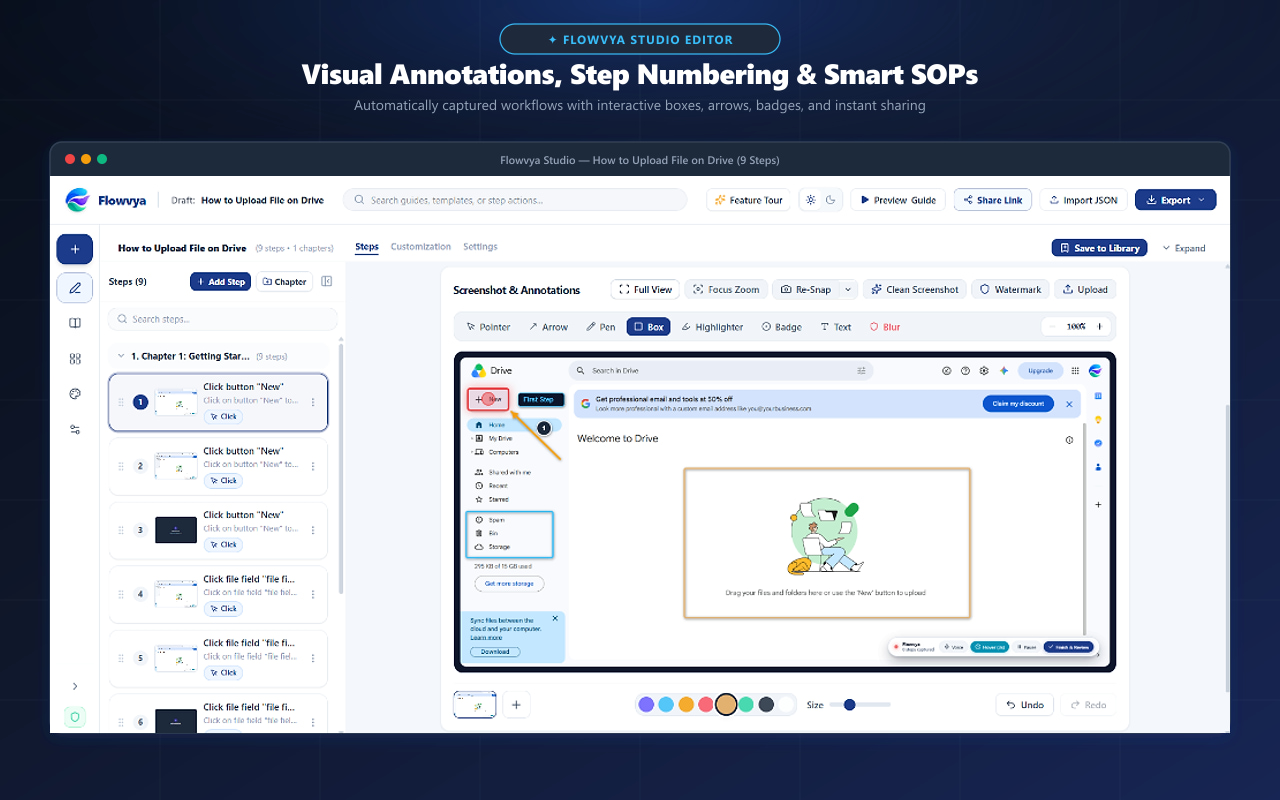
A clean, distraction-free workspace to edit step titles, format rich descriptions, reorder actions, and organize chapters.
- No sign-up required
- 100% Client-Side
- Ready in seconds
The Documentation Challenge
Why traditional manual approaches fail
Raw workflow recordings often contain extra clicks, mistyped text, or disordered steps that require tedious editing in generic word processors.
The Flowvya Solution
How Flowvya automates the process
Flowvya Studio was built exclusively for standard operating procedures. Drag to reorder steps, edit titles inline, add rich markdown formatting, and preview the entire guide in real time.
Interactive Demonstration
Try Flowvya Studio Editor live
Key Capabilities
Designed for speed, clarity, and reliability
Drag-and-Drop Reordering
Rearrange steps effortlessly. Downstream step numbers update automatically.
Rich Text Formatting
Add bullet points, code blocks, bold text, and warning callouts to every step instruction.
Chapter Grouping
Organize long 20+ step workflows into logical chapters like 'Prerequisites', 'Execution', and 'Verification'.
Full Undo & Redo (Ctrl+Z / Ctrl+Y)
Experiment freely with full restoration history for annotations and step edits.
Auto-Save to Local Storage
Never lose a draft. Every keystroke is saved immediately to Chrome's local storage sandbox.
1-Click Clean Screenshot
Temporarily toggle off all annotations to view the raw screenshot anytime.
Questions & Answers
Frequently Asked Questions about Flowvya Studio Editor
Yes! Flowvya Studio lets you insert manual steps and upload custom screenshots from your computer anytime.
Explore Related Features
Ready to use flowvya studio editor in your browser?
Install Flowvya for Chrome today. It is 100% free with no registration required.